Mileage Logs and Day Counting: Your Location History at Tax Time

It is March. You have a year of client visits to account for, a spreadsheet with eleven rows in it, and a memory that gets vague somewhere around September.
The information exists. Your phone recorded it. What it did not record is why you drove to an address in Hamburg on a Tuesday in April, and that is the column a tax office cares about most.
So let me be upfront about what this post is. Dawarich is not tax software. It doesn't know your country's rules, it can't tell a client visit from a trip to the garden centre, and it won't hand you a document you can file. What it does is remember dates and distances, which is the part nobody can reconstruct nine months later. The rest is you doing a small amount of work at the right time instead of a large amount of work in March.
What a log actually needs
People bring location history to tax season for two different reasons: claiming vehicle costs, and proving which country they were in. Different problems, same raw material.
For the vehicle side, every tax authority I've looked at wants roughly the same five things for each trip:
- The date.
- The distance.
- Where you went, as an address or at least a recognisable destination.
- Why you went, the business purpose.
- A record made at the time, rather than reconstructed later.
The rates and the paperwork differ by country. Germany has a per-kilometre rate for business driving, 0.30 EUR/km when I last checked. The US has a standard mileage rate that the IRS republishes every year. The UK has HMRC's approved mileage rates, starting at 45p a mile and dropping after an annual threshold. All of those numbers move, so look up the current one for your country before you calculate anything. I'm naming them to show that the shape of the requirement is the same everywhere, not to hand you figures to file with.
The fifth item is the one that catches people out. "Contemporaneous" is the word that keeps appearing in official guidance, and it means the log should exist because you wrote things down as you went, not because you sat down in March with a calendar and your best guess. A reconstructed log isn't worthless. It's weaker, and everyone in the conversation knows it.
I build location tracking software, not tax software. Dawarich reports what your location history says. It doesn't interpret any country's tax law, and countries genuinely disagree about how to count things. Treat all of this as evidence to bring to someone qualified, not as a conclusion.
Part one: the driving
Open the Timeline for any day you were out and about. The day header is a row of chips, one per way of moving, each with the distance you covered that way, plus how long you spent moving in total. For this purpose that is exactly the right shape: the driving figure arrives already separated from the walking and the cycling.
Underneath, the day breaks into legs with their own times and distances. A mixed journey shows its parts, so a walk to the station, a train ride and a cycle home read as three legs rather than one blurred line, and a stretch the detector isn't confident about says "moving" instead of guessing at a mode.
That gets you three of the five columns without doing anything: date, distance, and a good idea of where you went. Two are missing.
The purpose column
The only thing in Dawarich you can type free text into is a trip. There's no text field on a track, a visit, or a place. So if the business purpose is going to live inside Dawarich, it lives in a trip's notes.
That's less limiting than it sounds, because a trip is only a name and a date range, and a single day counts. Make one called "Meyer contract, site visit", set it to that Tuesday, and the purpose sits next to the route and the distance. Fifteen seconds on the day, worth considerably more in March than whatever you'd remember by then.
If you'd rather not create a trip per client visit, put the purpose in your own spreadsheet. That works, as long as you're clear that the spreadsheet is then the contemporaneous record and Dawarich is what backs up its dates and distances.
Either way, this column is yours. Software can log your movement, but it can't know your intent, and no tool that claims otherwise is being straight with you.
Longer trips
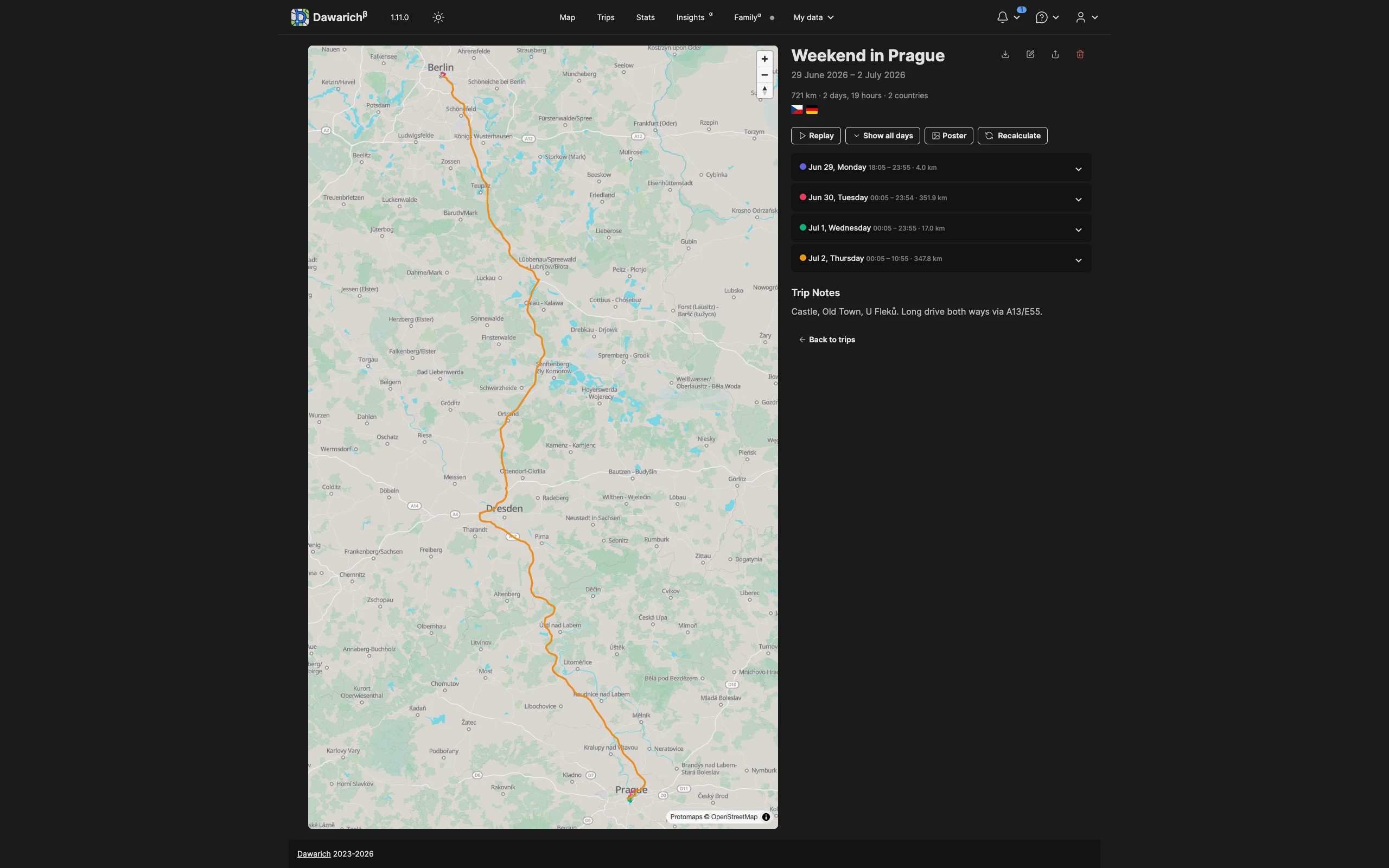
For travel that spans days rather than hours, Trips are the better container. You give a trip a name and a date range, and Dawarich pulls in the points from that window, draws the route, and reports the total distance, the duration, which countries you passed through, and a per-day breakdown with the distance for each day. The trip notes sit on the same page, so the reason for the journey lives next to the evidence of the journey.
The places you keep going back to
If you visit the same client sites repeatedly, name and tag those places once. After that, your visits carry recognisable destinations instead of coordinates, and the "where" column writes itself. See Visits and Places for how visit detection works.
Year-level totals
For an annual figure rather than a daily one, the Insights page reports total distance, active days, and countries visited for a chosen year. Watch one thing there: the Activity Breakdown splits your time across transportation modes, not your distance. It tells you what share of the year you spent sitting in a car, which is interesting, and it doesn't tell you how many of your kilometres were driven ones. For a driven-kilometre total you are still adding up tracks.
Two honest notes about this half of the post.
Tags attach to places only. Not to trips, not to tracks. So you can mark a place as a client site, but you can't flag an individual drive as business rather than personal. That separation happens in how you name and annotate things, and partly in your own head.
The transportation mode is inferred, not measured. Dawarich works it out from how you moved — speeds, heading changes, where you stopped — and it can be wrong. Bus, boat and motorcycle in particular can't be told apart from driving by movement alone, so they only show up if your tracking app reported them or you set them yourself.
When a leg is wrong, click the mode name and pick the right one; it saves as you pick. Do check, because a drive filed as a train is a drive missing from your mileage. See Transportation Modes for what the detector can and cannot distinguish.
Part two: which country were you in
The other tax question location history answers well is the counting one. How many days was I in Germany last year. Am I close to a threshold. Did that stretch of remote work from Portugal add up to something I need to declare.
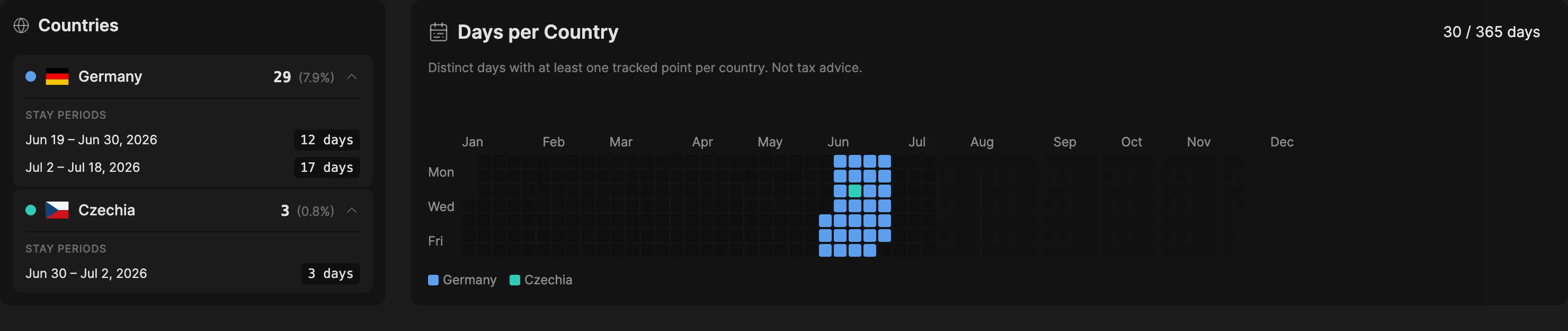
Dawarich has a feature for this, called Days per Country. It sits on the Insights page and follows the year you pick at the top, alongside the rest of the yearly numbers.
You get two things. A list of countries, each showing the number of days with at least one recorded point and that number as a percentage of the year, which opens up to the consecutive stay periods with their start and end dates. And a calendar of the year with one colour per country, so a border-hopping month looks different from a settled one at a glance. The heading tells you how many days you tracked at all, out of the full year. Any country that reaches 183 days gets flagged, because that number appears in a lot of residency rules.
Now the important part, and the reason I'd rather you read this section than skip it. The counting rules decide whether the number means what you think it means.
Any presence counts. One recorded point in a country on a given day makes that day count for that country. Fly from Germany to France on a Tuesday and the Tuesday counts for both. The per-country totals can therefore add up to more than your total tracked days. Most tax authorities have their own rule about travel days, and Dawarich does not guess which one applies to you.
Days are bounded by UTC, not by your local clock. A point recorded at 00:30 in Berlin belongs to the previous day as far as the counter is concerned. Near midnight, near a border, that can move a day from one country to another.
Untracked days count for nothing. If your phone was off, or tracking lapsed for a fortnight, those days are absent rather than attributed to wherever you were last. This is why the feature also reports your total tracked days: 150 days in one country is 75% of your tracked time if you only tracked 200 days, but 41% of the year.
Points need to know their country, which they get from reverse geocoding. If you imported years of history and never geocoded it, this screen will look emptier than your life actually was.
If you're watching the Schengen 90/180 window rather than a residency threshold, the stay periods are the part to use, because that rule works on a rolling window instead of a calendar year. Dawarich hands you the dated periods and you do the rolling arithmetic yourself. The 183-day flag is calendar-year based and won't help you with Schengen.
Full detail on all of it is in the Days per Country docs. On availability: it's free for everyone self-hosting, included with Pro and Family on Cloud, and unavailable on Lite.
Part three: office days and home days
I work hybrid in Germany, so this is the case I actually care about.
Two numbers matter. The Homeoffice-Pauschale gives you a flat amount for each day you worked from home, 6 EUR a day capped at 1,260 EUR a year when I last looked, which works out to 210 days, and it no longer requires a separate study room. The Entfernungspauschale covers the days you travelled to the office instead. You don't get both for the same day. So the year splits into office days and home days, and you need a count of each.
Dawarich gets you part of the way. Draw an area around the office and visits there get detected and named, so every office day carries a visit, and usually a commute track with a distance attached. That is solid day-level evidence.
What it won't do is add them up. Days per Country stops at country granularity, and there's no per-place equivalent. The closest thing is Insights, where Top Visited Locations ranks your places by number of visits and total time spent, but that time is cumulative hours rather than distinct days, so 55 visits to the office doesn't tell you how many office days you had. Getting that number means walking the Timeline month by month. Twelve screens for a year is tolerable once annually, and it's still worse than a number would be. I know.
One thing makes that gap smaller than it looks. Presence at home is not the same as working from home. A Sunday, a sick day, a holiday and a home-office day are identical in location data, and no amount of tracking will separate them. So the direction that works is to count office days, which are visible and evidenced, then derive home days from your work calendar minus office days minus leave. That is arithmetic you would be doing regardless. What Dawarich contributes is corroboration for the office count, which is the number more likely to be asked about.
What Dawarich doesn't do
I'd rather you find this out here than after you've committed to a workflow.
There's no CSV export. Exports are JSON, GPX, or a full archive. If you want rows in a spreadsheet, you read the numbers off the screen and type them in. This one genuinely annoys me.
There's no business-versus-personal flag. No checkbox on a track, no toggle on a visit. How you name your places and which days you wrap in a trip is the separation.
It's not an odometer. Distance comes from summing along your recorded points, so a gap in tracking shortens a trip and GPS drift can lengthen one. It's a good estimate and it is not a certified reading. If your claim needs odometer numbers, use your odometer.
It doesn't know any tax law. No partial-day rules, no travel-day exclusions, no multi-year averaging, no idea whether your country counts the day you arrive.
It can't fix the past. Days you didn't track are gone. Which brings me to the only real advice in this post.
Set it up now, not in March
The whole argument for doing this with tracking software rather than memory is that the record gets made at the time. That only works if the setup happens before the year you're accounting for.
Four things, once:
- Install a tracking app and leave it running. The Dawarich iOS and Android apps do continuous background tracking. OwnTracks, Overland, and GPSLogger work too.
- Turn on reverse geocoding. Without it your points have coordinates but no country, and the day counter has nothing to count.
- Name and tag the places that matter. Client offices, sites, the coworking space you rent. Fifteen minutes now, useful every month after.
- Write the purpose down the same week. Not the same year. A trip with a note, or a line in your own sheet, but written while you still remember it. This is the habit that makes the log contemporaneous, and it's the only part software can't do for you.
If you already have Google Timeline exports sitting in a folder, import them. The history won't have purposes attached and it wasn't recorded contemporaneously, so it's supporting material rather than a primary record, but it's better than the eleven-row spreadsheet.
And if you just want to see what your Google export contains before committing to anything, the Timeline Mileage Calculator reads your export in the browser, adds up the driving, and gives you a CSV. Nothing is uploaded unless you explicitly ask it to save the file to a Dawarich account.
Getting started
Dawarich is open source and self-hostable, and Days per Country is unrestricted when you run it yourself. If you'd rather not deal with Docker, Dawarich Cloud has a 7-day trial that runs on the Pro plan, so the day counter works while you're trying it out.
Either way, the useful move today is starting the tracking. The mileage log and the day count are just what you read off it later.
Cheers!