Anyone can buy a map of Berlin.
Only you have this route.
The ride you trained for, the year you walked everywhere, the road trip you still talk about — already sitting in your location history as a line nobody else has. Poster Studio turns it into something you can frame, or set as your wallpaper, or post.
No card for the trial · 14-day refund after that · Export everything, any time
Covered by
XDA DevelopersMakeUseOfc't MagazineIt's FOSSSeventeen themes, then every colour underneath them
Every poster below is the same two years of Berlin — 15 July 2024 to 15 July 2026 — exported from the studio with nothing changed but the theme. When none of the seventeen is quite right, open the colour editor and set the water, parks, railways, boundaries, buildings and each road class yourself — and give the track its own colour, opacity and width, anywhere from 50% to 300%, so the line still reads at A0 or on a phone screen.
All seventeen, same Berlin route — scroll sideways, then click any one to enlarge it and step through with the arrow keys.
A design tool, not a generate button
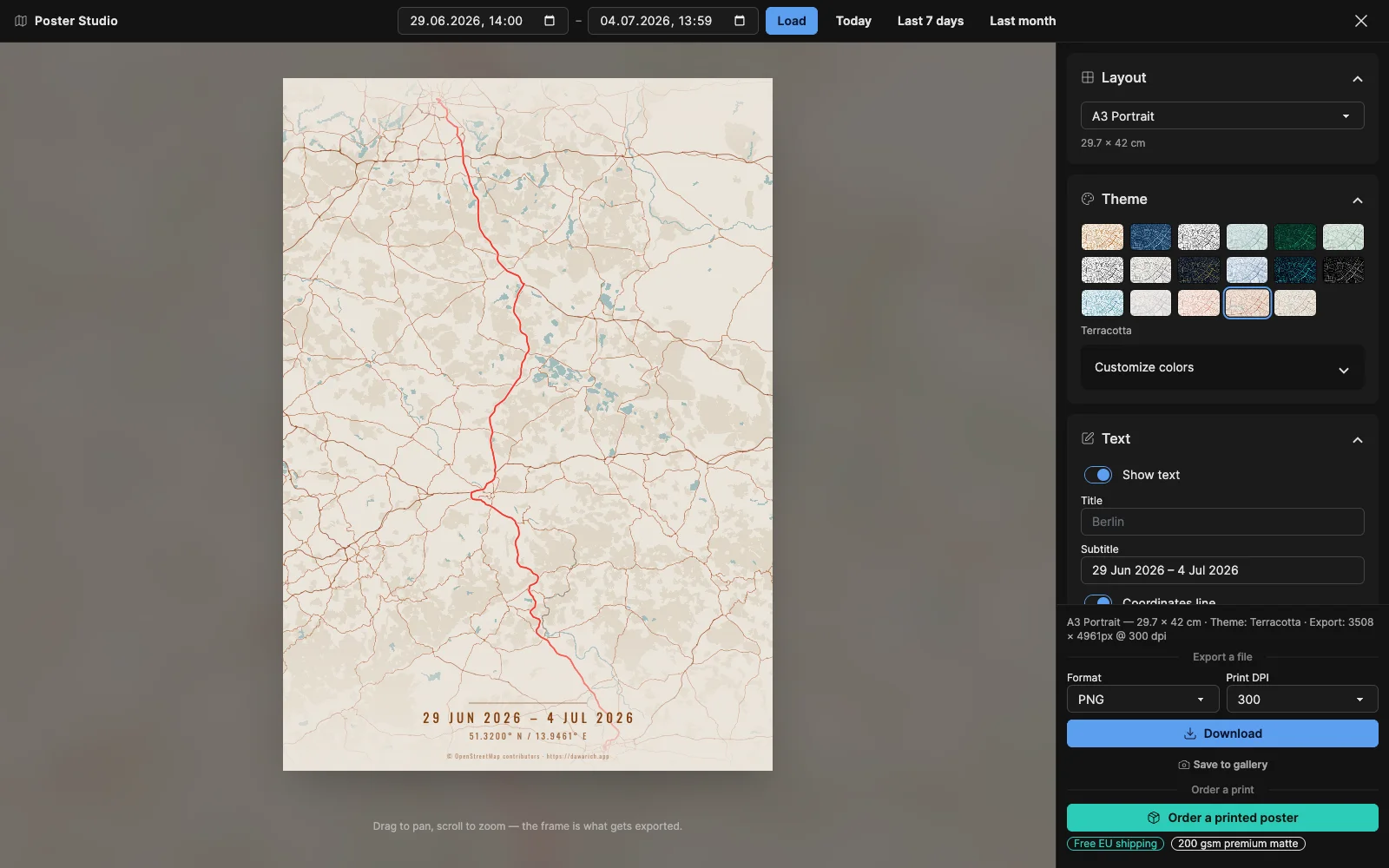
Full-screen studio. Drag to pan, scroll to zoom, compose the frame, then export it at whatever size you actually need.
A poster is only one of the twenty-two
Print is the obvious one — A5 through A0, 30 × 40, 50 × 70 and 70 × 100 cm, US Letter, portrait or landscape. But the same map also exports as a phone or desktop wallpaper, up to 4K and ultrawide, and as an Instagram post, a story, an X header or a YouTube thumbnail. Print layouts are sized in real paper and DPI; screen layouts are pixel-exact.
Same composition, twenty-two ways outPrint · 12
Social · 5
Wallpaper · 5
The frame you see is the frame you get
Pick a layout before you compose and the preview reshapes to it, so a story crop is never a surprise. The studio shows the finished dimensions as you work — an A3 portrait at 300 DPI exports 3508 × 4961 pixels — and warns you when a view is too wide for the largest poster area instead of silently zooming in.
Before you export it
How is this different from the map posters everyone sells?
Those are a city outline anyone can buy with a name printed underneath. This is the actual line you walked, cycled or drove, drawn from the GPS points in your own account.
Will the printed poster match what I designed?
The frame you compose is the frame that prints — the studio uses the same framing as the renderer, and warns you if a view is too wide for the largest poster size rather than silently zooming in.
What is the print quality?
200 gsm premium matte, which has no glare, so the route line stays crisp under room lighting. Shipping within the EU is included in the price, and checkout runs through Stripe so your card details never touch Dawarich.
Do I have to order a print to use the studio?
No. Download the PNG or PDF and take it to any printer you like, keep the file, or never go near paper at all — plenty of people export a 4K desktop wallpaper or a phone background and stop there. Ordering is one option, not the point of the feature.
Can I do this on a self-hosted instance?
Yes, the studio is part of the open-source application. Print ordering is on by default and can be switched off entirely on your own instance.
Put your own route on the wall — or the lock screen
Import a route you already have or track a new one, then open the studio and start composing. No account yet? Try the free browser version with any GPS file.
- 7 days free, no card
- 14-day refund
- Export everything, any time
- Or self-host it free